
メインへ

KJCLUB 日韓文化交流へようこそ。

How to solve the problem of wire drawing in 3D printing?

528
細分類: 自由テーマ 2889491 JA Lv 30

Obvious wire drawing appears when printing is idling.

Material: The 3d printer filament absorbs water and leads to drawing during printing, so it should be dried before printing according to different 3d printing materials(PVA, PA, TPU, PC, PEEK).

Printing: Easy-absorbent 3d printer filaments can be printed directly in the air. During the printing process, it should be equipped with a sealed material box, such as eBOX.

Slicing: Retraction distance and retraction compensation are set correctly, retraction distance is too high and it is easy to lack of material, too low and easy to draw; path optimization, it is recommended to open the start point alignment function when slicing, close the retraction Z-axis lift, avoid going through the shell when empty range of motion, optimize the slicing printing path, and appropriately reduce the printing speed to achieve the best printing effect, which is of great help to the 3d printer filaments with high viscosity and easy to draw like PETG.

Temperature: the higher the printing temperature, the easier it is for wire drawing, it is recommended to reduce the printing temperature to ease the wire drawing
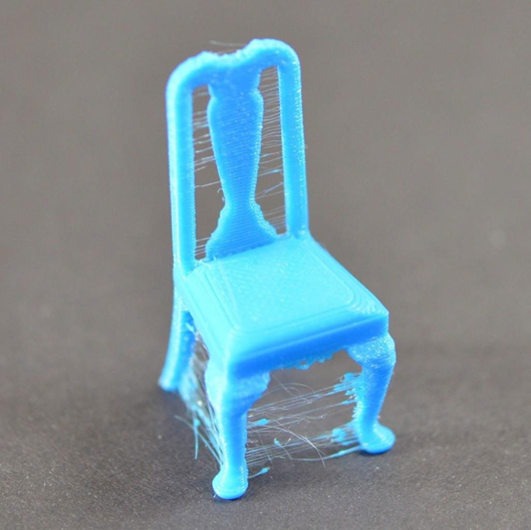
Wire drawing

翻訳を見る

How to solve the problem of wire drawing in 3D printing?

Obvious wire drawing appears when printing is idling.

Material: The3d printer filamentabsorbs water and leads to drawing during printing, so it should be dried before printing according to different 3d printing materials(PVA, PA, TPU, PC, PEEK).

Printing: Easy-absorbent 3d printer filaments can be printed directly in the air. During the printing process, it should be equipped with a sealed material box, such as eBOX.

Slicing: Retraction distance and retraction compensation are set correctly, retraction distance is too high and it is easy to lack of material, too low and easy to draw; path optimization, it is recommended to open the start point alignment function when slicing, close the retraction Z-axis lift, avoid going through the shell when empty range of motion, optimize the slicing printing path, and appropriately reduce the printing speed to achieve the best printing effect, which is of great help to the 3d printer filaments with high viscosity and easy to draw like PETG.

Temperature: the higher the printing temperature, the easier it is for wire drawing, it is recommended to reduce the printing temperature to ease the wire drawing

Wire drawing

いいね・コメントにはログインが必要です。

コメント ( 0 )

フリートーク

全4,613件

32 / 231ページ

  1. 細分類: 宣伝
    3,268
    2890722 KO
  2. 細分類: 宣伝
    3,440
    2888567 KO
  3. 細分類: 宣伝
    3,599
    2886658 KO
  4. 細分類: 宣伝
    3,278
    2882220 KO
  5. 細分類: 宣伝
    3,210
    2879997 KO
  6. 細分類: 宣伝
    3,342
    2876835 KO
  7. 細分類: 宣伝
    3,443
    2875470 KO
  8. 細分類: 宣伝
    Lv 5
    3,678
    2875414 JA
  9. 細分類: 宣伝
    3,490
    2871722 KO
  10. 細分類: 宣伝
    3,638
    2870906 KO
  11. 細分類: 宣伝
    3,295
    2870565 KO
  12. 細分類: 宣伝
    3,318
    2869756 KO
  13. 細分類: 宣伝
    3,331
    2868349 KO
  14. 細分類: 宣伝
    3,130
    2867778 KO
  15. 細分類: 宣伝
    3,341
    2867238 KO
  16. 細分類: 宣伝
    3,059
    2864610 JA
  17. 細分類: 宣伝
    2863195 JA
  18. 細分類: 宣伝
    Lv 15
    3,597
    2863129 JA
  19. 細分類: 宣伝
    3,216
    2862763 KO
  20. 細分類: 宣伝
    3,186
    2858873 KO